Skip to content
LESS GUESSING. MORE MAKING.

Learn Fusion.
Make your
own stuff.

You have an idea for something you want to build.

Then you open Fusion and think… okay, where do I start?

I’ll help you learn the tools, figure out the frustrating parts, and turn that idea into something you made yourself.

Practical skills. Real projects. One step at a time.
FROM AN IDEA TO “I MADE THAT.”
Real Fusion Jumpstart exercises and part drawings laid out on a wooden workbench
Start small. Make something useful.Real exercises from Fusion Jumpstart.
FOR THE PEOPLE WHO THINK…

“I bet I could make that.”

YOU’RE IN THE RIGHT PLACE.
01 / WHY LEARN FUSION?
THE IDEA → THE DESIGN
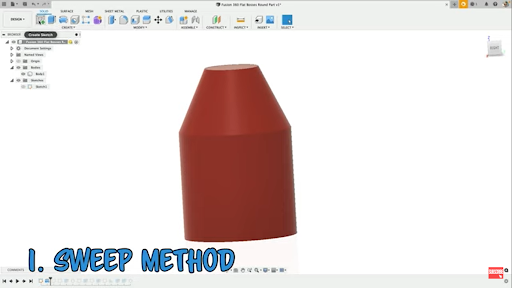
An actual Fusion model using the sweep method, from Tyler’s modeling tutorial
A real Fusion example from my tutorials.
Not Lucy’s tag project. Just another idea taking shape.
You don’t need to know every tool
to make something useful.

It starts with something
you want to fix.

For me, one project started with our dog’s jingling tags.

Lucy was basically a one-dog marching band.

I wanted to make something to keep the tags quiet. So I took a picture, brought it into Fusion, and started designing.

The picture was terrible.

The first prints didn’t fit.

A few changes later, I had something that worked—and a quieter dog.

Until she started barking at the raccoons.

That’s what I love about learning Fusion.

You notice a problem. You have an idea. You learn enough to try it.

02 / COURSES & SUPPORT

What do you need help with?

Start where you are.

Whether you’re opening Fusion for the first time or trying to figure out why your sketch won’t extrude, there’s a next step.

FUSION JUMPSTARTSTART HERE

I’m new to Fusion.

Let’s get you comfortable with the core tools.

Sketching. Dimensions. Constraints. Turning a sketch into a 3D part.

We’ll work through practical examples so you can start designing your own stuff.

Start with Jumpstart
YOUR FIRST STEP, NOT EVERY STEP.
Fusion Jumpstart lesson: Get the Map of Fusion 360
AN IDEA + A FEW USEFUL SKILLSYOUR OWN DESIGN
02
FUSION RESCUE

I’m stuck.

Your sketch won’t extrude.

A feature fails.

You change one thing and suddenly three other things break. Fun.

Learn how to figure out what went wrong, fix it, and keep working.

Explore Fusion Rescue
03
FUSION BASECAMP

I want to get better.

You know the basics. Now let’s make your designs easier to work with.

These are the best practices I wish I’d learned earlier.

Cleaner sketches. Better organization. Models you can change later without wondering what you were thinking.

Explore Basecamp
04
DAILY FUSION TIPS

Included in Fusion Basecamp.

I want to learn a little each day.

One practical Fusion lesson in your inbox each day.

A tool to try. A mistake to avoid. An easier way to do something.

Small lessons you can put to work on your next design.

Explore Daily Tips
05
FUSION AI COACH

Included in Fusion Basecamp.

I have a question.

Ask a Fusion question while you’re working.

Get answers based on my YouTube tutorials to help you figure out your next step.

Explore the AI Coach
03 / THE FREE STUFF

A little Fusion
encouragement
in your inbox.

I share new tutorials, useful tips, and stories from the things I’m making—and occasionally messing up.

Sometimes you need a better way to use a tool.

Sometimes you just need a reason to open Fusion and give that idea five minutes.

Join my free email list. Let’s keep you building.

04 / THE GUY BEHIND THE TUTORIALS
Tyler Beck, the teacher behind Tech & Espresso
TYLER BECKTEACHER. MAKER. STILL LEARNING.

Good coffee. Useful skills.
A little trial and error.

Hey, I’m Tyler.

I love teaching and figuring out how to make complicated things easier to understand.

That’s why I started Tech & Espresso.

I live in Utah with my wife and three kids. I love being in the mountains, making things, and explaining a tool until someone says, “Oh. Now I get it.”

I also make mistakes. Bad sketches. Failed prints. Designs that need another attempt.

That’s part of learning.

My goal is to help you get comfortable enough with Fusion to take an idea and build it yourself.

You don’t need to learn everything before you start.

Learn a few useful skills. Make something. Get help when you’re stuck.

Then try the next thing.

YOUR NEXT IDEA IS WAITING.

What have you been
meaning to make?

That part you want to fix.

That idea you’ve been thinking about.

That project you keep putting off.

Let’s get you the skills to give it a try.

Find Your Next Step